
Design AKC Rally Courses in Minutes, Not Hours
Online software to map, refine, and share the perfect run.
No credit card required.
Finally — a Rally course design tool built for the way you actually work! Whether you're an AKC Rally judge mapping courses for an upcoming trial, an instructor laying out sequences for class, or an exhibitor sketching practice runs at home, Rally Course Pro makes it fast and foolproof. Drag and drop official AKC Rally signs onto a virtual ring, build nested courses with multiple levels sharing a single map, run built-in validation checks for Novice through Master, and export print-ready course maps, sign lists, and equipment pull sheets — all from your browser or tablet. No download needed, just log in and start designing.
Everything You Need for Course Design, All in One Place
From first drag to final print, Rally Course Pro online software handles the entire workflow so you can focus on designing a great course.
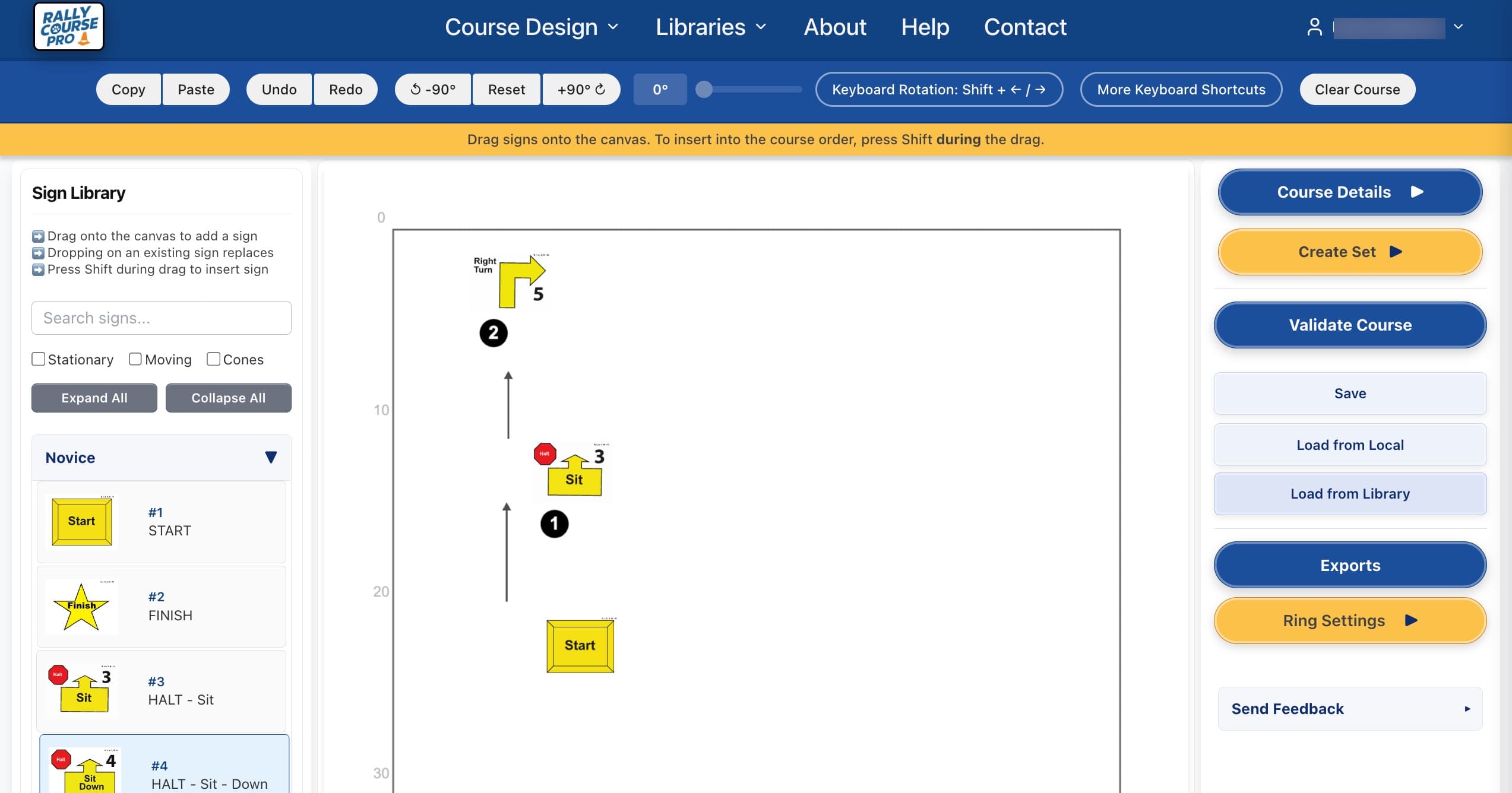
Drag-and-Drop Editor
Place Rally signs on the canvas with point-and-click precision.
Course Validation
AKC validation checks for every class level.
Beautiful Exports
Print-ready course maps, sign lists, and pull sheets — everything you need for trial day or teaching.
Tablet-Friendly
Design courses with a finger or Apple Pencil — perfect for on-the-go course building.
Cloud Course Library
Save, organize, and revisit your courses anytime from any device.
Free 2-Week Trial
Explore every feature with a full-access trial — no credit card required.
Simple, Affordable Pricing
$30
/ year
- ✓Full access to the course editor
- ✓Cloud course library
- ✓All exports — maps, sign lists, pull sheets
- ✓Free 2-week trial — no credit card required
What Judges Are Saying
Hear from AKC Rally judges who helped shape Rally Course Pro.
The Rally Course Pro software has been such a great tool for designing courses. It is very user friendly and the availability to build sets of courses and store on the cloud or on your computer is very beneficial. Highly recommended and subscribers will not be disappointed. This software is a must for any Rally judge.
Renée M.
AKC Rally Judge
Rally Course Pro enabled me to quickly design nested courses. My favorite feature is the ability to change ring dimensions which is a real lifesaver for unusual size rings. Rally Course Pro is easy to use, even for the technologically challenged!
Laura R.
AKC Rally Judge & Beta Tester
Quality professional product, easy to use and can easily generate several options for maps, description pages, score sheets, and pull sheets. The total flexibility of what you can do making the maps and then having all the supporting elements be accurately created is huge.
Debbie A.
AKC Rally Judge & Beta Tester
I’ve been using this rally course design software for a few months now, and it’s honestly exceeded my expectations. The interface is clean and easy to navigate, which made getting started really simple even without formal training. This is a fantastic resource!
Jennifer E.
AKC Rally Exhibitor
Frequently Asked Questions
Everything you need to know before you start designing.
Does Rally Course Pro require a software download?
No. Rally Course Pro is entirely browser-based — there is nothing to install or update. Log in from any modern browser on a Mac, Windows PC, or tablet and start designing immediately.
Can I design courses on a tablet or iPad?
Yes. Rally Course Pro is built to be tablet-friendly from the ground up. The drag-and-drop editor works with a finger or Apple Pencil, so you can build courses at ringside or in class just as easily as at a desktop.
What is a nested course, and does Rally Course Pro support them?
A nested course combines two class levels — such as Choice/Master or Intermediate/Advanced — on the same map. Rally Course Pro handles nested courses seamlessly: it manages the alternate jump signs for each level and generates accurate sign lists and a combined Pull Sheet for the entire course set.
Does Rally Course Pro validate courses against AKC rules?
Yes. Built-in validation checks your course against AKC Rally rules for every class level, from Novice through Master. After placing your signs, click Validate Course and the software reports any errors — wrong sign count, illegal sign combinations, or missing required signs — before you print anything.
What can I export from Rally Course Pro?
Rally Course Pro generates print-ready PDFs for course maps, sign lists with full sign descriptions, equipment pull sheets, and multiple formats of judge scoring tools. Instructors use sign list exports for class handouts; judges use course maps, pull sheets, and scoring tools for trial day.
How much does Rally Course Pro cost?
Rally Course Pro is $30 per year for a full-access subscription. There is a 14-day free trial with no credit card required, so you can explore every feature before committing.
Who is Rally Course Pro designed for?
Rally Course Pro is used by AKC Rally judges designing trial courses, instructors building sequences for classes, and exhibitors mapping practice runs at home. Anyone who needs to plan, visualize, or share an AKC Rally course layout will find it useful.
What AKC Rally class levels does Rally Course Pro support?
Rally Course Pro supports all current AKC Rally class levels: Novice, Advanced, Excellent, and Master. Validation, sign libraries, and export labels all respect the rules and sign sets for each level.
See It in Action
A sneak peek at the Rally Course Pro editor.
Ready to Design Your Next Course?
Start your free 2-week trial today — no credit card required.